


- What Does a Network TAP Do?
- What Does a Network TAP Do?
- How a Network TAP Works
- Passive vs Active TAPs
- Evaluating TAPs
- How NETSCOUT Helps

Brad Christian
Senior Search Engine Optimization Specialist
Understanding Network TAPs
In order for monitoring or security tools to be effective, they must first be able to see traffic on a network link. This is achieved by using a TAP, which stands for Test Access Point. A TAP is a purpose-built device that provides direct, inline access to network traffic,. Because the TAP works at the level of the cable, it sees the traffic exactly as it travels between two points on the network.
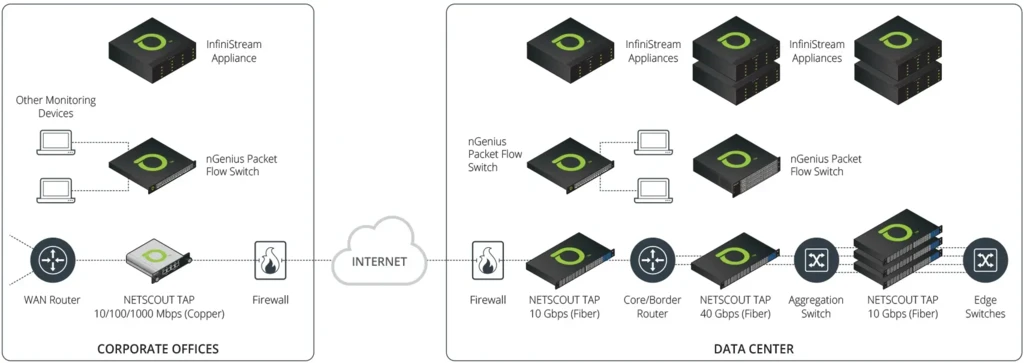
There are two main types of network TAPs: hardware and software. Hardware TAPs are physical devices installed on a physical copper or fiber link, usually at a point where data is transmitted between two devices or between a device and a network. TAPS are deployed inline between two network segments, such as a router, firewall, or switch. They passively copy live traffic to feed data to tools, such as network analyzers, network detection and response (NDR) or intrusion detection systems or more often today, to Network Packet Brokers (NPBs) or Packet Flow Switch (PFS), that distributes appropriate copies of traffic to the necessary monitoring or security tools.
Software, or virtual, TAPs do the same job inside virtualized and cloud environments, where there is no cable to attach to, and traffic has to be mirrored another way. They work by intercepting data packets transmitted over the network and copying them to a monitoring device.
Both types of network TAPs are helpful for various applications, includingcybersecurity, network observability, and troubleshooting. They allow network administrators to monitor and analyze network traffic in real time, which can help them identify and resolve issues, improve network performance, and ensure the security of their networks. In the case of security, TAPs can help identify malicious activity or security threats.
What does a Network TAP Do?
As a TAP copies the traffic passing across it, it does not interfere with the original traffic, allowing it to see the traffic that flows over the tapped network segment or between the two connected devices at full speed. A copy of each packet is sent out via a separate monitor port to a monitoring device, an analyzer, or a security tool. This is what is meant by out-of-band access. The tools receive their own copy of the data, off to the side, with no role in forwarding the live traffic.
Picture a TAP placed on the link between a switch and a router. Production traffic enters one side of the TAP and leaves the other, uninterrupted, exactly as it would over a standard cable. At the same time, the TAP mirrors that traffic to its monitor ports, where the tools connect. Those using the network are completely unaware of this activity in the background. Meanwhile, the monitoring and security tools receive an accurate stream of everything that crosses the link.
How A Network TAP Works: Traffic Flow, Packet Copying, & Monitoring Output
Once a TAP is deployed directly on a link, it passes a copy of the packet stream. To the devices on either side of the TAP, the path looks unchanged. A passive fiber TAP splits the light on the fiber, sending most of it onward and a small portion to the monitor output. A copper TAP copies the electrical signal. In neither case does the TAP hold an IP or MAC address on the production link, so it stays invisible to the network.
How packet copies reach monitoring tools
A link is usually full duplex, carrying traffic in both directions at once. For example, on a 10G Ethernet link, that means up to 10G each way, 20G in total. A TAP copies both directions of network traffic to its monitor ports. Many TAPs present each direction on its own output, one port for transmit and one for receive; others aggregate both into a single feed for tools that expect one stream. Either way, the appliance, packet broker, or capture tool receives an exact copy, including VLAN tags, malformed frames, and accurate timing.
Passive vs. Active TAP behavior
TAP types differ mainly in power needs, fail-safe behavior, and link support. Passive fiber TAPs use an optical split, so they require no power and have no moving parts, and the link keeps running regardless of the TAP. Active TAPs, common on copper, regenerate the signal, thus requiring power, which is why they include fail-safe or bypass mechanisms to keep the link up if that power fails. Bypass TAPs extend the idea to inline security appliances, failing open or closed so a device outage does not drop the link. Two related behaviors include regeneration, which sends one link’s traffic to several tools, and aggregation, which combines several links into one feed.
How To Evaluate Whether a TAP Fits Your Environment
The following is a short checklist to use when considering a TAP:
- Media type: copper or fiber on the link you need to see
- Link speed, from 1G up to 100G or beyond
- Traffic volume, and whether the link runs hot enough to risk SPAN drops
- Monitoring goals: performance, troubleshooting, security, compliance
- Tool inputs: how many tools need the traffic, and in what form
- Aggregation or regeneration needs across multiple links or tools
- Fail-safe requirements for any inline path
- Whether a network packet broker is already in place to distribute traffic
Common deployment patterns to recognize
TAPs are often deployed in several ways. For instance, a TAP feeds a copy of a critical link to an intrusion detection system. A TAP supplies a packet capture appliance with a complete record. Or a TAP hands traffic to a network packet broker, which filters and distributes it to several monitoring and security tools at once. Recognizing which scenario you are building toward usually makes the choice of TAP straightforward.
How NETSCOUT Helps
NETSCOUT offers a broad family of hardware network TAPs built for enterprise and service provider networks, with options for nearly any link type and speed, from 10M copper to 100G fiber. For inline paths, External PowerSafe TAPs add active bypass protection, and the nGenius Cloud vTAP extends the same visibility into public cloud environments such as Microsoft Azure. Paired with nGenius Packet Flow Switches acting as a packet broker, NETSCOUT TAPs let teams aggregate, filter, and distribute traffic to every tool that needs it. The result is dependable packet access that strengthens performance monitoring, observability, and security across the network.